
Into 3D, and what next
Everything you've learned (variables, decisions, loops, functions and types) works just the same in 3D. Here's a first taste, and some ideas for where to go from here.
A first 3D world
; A first look at 3DGraphics3D 640, 480SetBuffer BackBuffer(); a camera to look through, and a light to see bycamera = CreateCamera()PositionEntity camera, 0, 3.5, -8TurnEntity camera, 15, 0, 0 ; look down a littlelight = CreateLight()RotateEntity light, 50, 30, 0; the ground, a cube and a ballground = CreatePlane()EntityColor ground, 80, 160, 80cube = CreateCube()PositionEntity cube, -3, 1, 0EntityColor cube, 255, 120, 60ball = CreateSphere(24)EntityColor ball, 80, 160, 255; a ready-made character from the media folder, playing its "idle" animationhero = LoadAnimMesh("../../media/kenney/mini-characters/character-knight.glb")ScaleEntity hero, 3, 3, 3PositionEntity hero, 3, 0, 0TurnEntity hero, 0, 180, 0Animate hero, 1, 1, FindAnimSeq(hero, "idle")While Not KeyHit(1) ; arrows walk the camera about If KeyDown(203) Then TurnEntity camera, 0, 2, 0 If KeyDown(205) Then TurnEntity camera, 0, -2, 0 If KeyDown(200) Then MoveEntity camera, 0, 0, 0.1 If KeyDown(208) Then MoveEntity camera, 0, 0, -0.1 TurnEntity cube, 1, 2, 0 ; spin the cube a little every frame PositionEntity ball, 0, 1 + Abs(Sin(MilliSecs() / 4)) * 2, 0 ; bounce the ball UpdateWorld ; animations (and physics, collisions) move on RenderWorld ; draw the 3D world from the camera Text 10, 10, "Arrows move the camera. Escape quits." FlipWendEnd
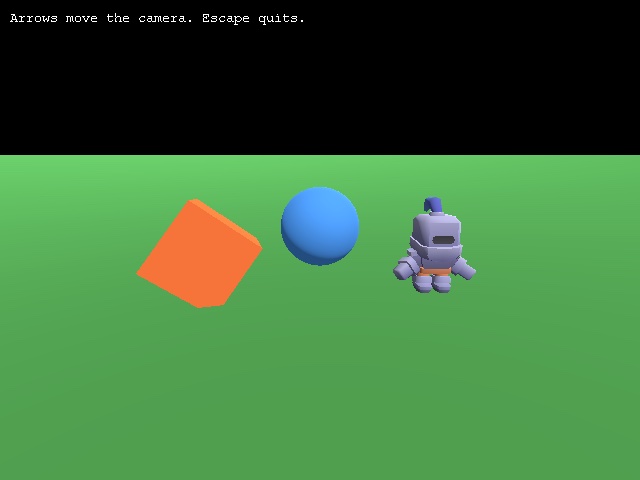
In 3D, everything in the world is an entity: cameras, lights, shapes and models.
Graphics3Dopens a window that can show a 3D world.- A camera is your eye in the world, and a light lets you see.
CreateCube,CreateSphereandCreatePlanemake simple shapes, andLoadAnimMeshloads a ready-made model, here a knight from the free Kenney models in themediafolder. - Positions now have three parts: x (across), y (up) and z (into the screen).
PositionEntityputs an entity somewhere,MoveEntitymoves it the way it's facing, andTurnEntityturns it. - Each frame,
UpdateWorldmoves animations (and physics and collisions) on, andRenderWorlddraws the world as the camera sees it. ThenTextcan draw on top, just as in 2D, beforeFlipshows it all.
Where next?
- Make Star Catcher your own. The ideas at the end of chapter 11 are a great next project.
- Read other people's code. The Samples are full of programs to open, run and change, including the ArcBasic showcase of 3D, physics, shadows and animated characters.
- Look things up. The Command reference lists every command, and the Language reference explains the language in full. Remember that F1 on any command takes you straight to its page.
- Start small. The best first games are tiny: Pong, a maze, snake, a shooting gallery. Finish something small before starting something big.
Have fun. Every game you've ever played started as an empty editor and one line of code, just like yours did.