
Lots of things: arrays and types
One ship needs an x and a y. A hundred aliens would need two hundred variables, unless you use an array or a type, which let one name hold as many things as you need.
Arrays: a numbered row of boxes
; Arrays: one name, lots of valuesGraphics 640, 480SeedRnd MilliSecs()Dim height(15) ; 16 boxes: height(0) to height(15)For i = 0 To 15 height(i) = Rand(60, 300)NextClsColor 30, 20, 60Cls; draw the buildings, each 40 pixels wide, standing on the bottom of the screenFor i = 0 To 15 Color 40 + i * 5, 40, 80 Rect i * 40, 480 - height(i), 38, height(i) ; lit windows Color 255, 220, 120 For wy = 480 - height(i) + 10 To 470 Step 20 If Rand(1, 3) = 1 Then Rect i * 40 + 8, wy, 8, 8 If Rand(1, 3) = 1 Then Rect i * 40 + 22, wy, 8, 8 NextNext; find the tallest buildingtallest = 0For i = 1 To 15 If height(i) > height(tallest) Then tallest = iNextlabelX = tallest * 40 + 19If labelX < 40 Then labelX = 40 ; keep the label on the screenIf labelX > 600 Then labelX = 600Color 255, 255, 255Text labelX, 480 - height(tallest) - 20, "Tallest!", TrueText 10, 10, "Press any key"WaitKeyEnd
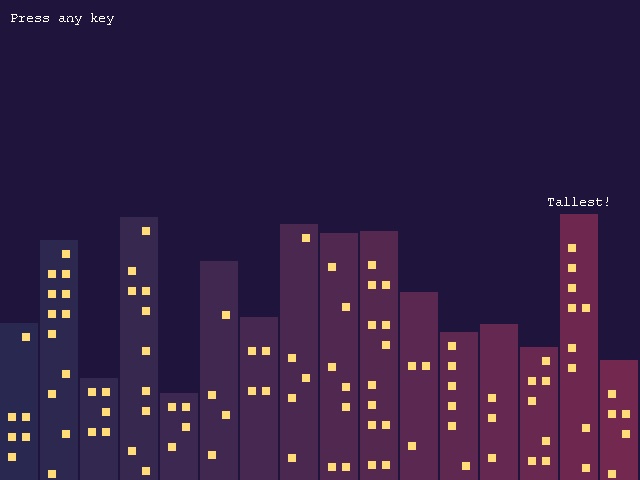
Dim height(15) makes 16 boxes called height(0), height(1) and so on up to height(15). The number in brackets is the box's index, and it can be a variable: height(i) inside a For i loop visits every box in turn. Loops and arrays are made for each other.
The last loop finds the tallest building. It starts by assuming building 0 is tallest, then checks each of the others, and whenever one is taller it remembers that one instead. You'll use that pattern again and again: finding the highest score, the nearest enemy, the cheapest item.
Arrays can hold any kind of value: Dim names$(10) holds strings, and Dim speeds#(10) floats.
Types: things with details
Arrays are great when you know how many things there are. Often you don't: bullets are fired, snowflakes fall, enemies are defeated. A type describes what one thing knows about itself, and you can make new ones and get rid of them whenever you like.
; Types: lots of things, each with its own detailsGraphics 640, 480SetBuffer BackBuffer(); what every snowflake knows about itselfType Flake Field x#, y# Field speed# Field sizeEnd TypeWhile Not KeyHit(1) ; a new flake or two every frame For n = 1 To 2 f.Flake = New Flake f\x = Rand(0, 639) f\y = -5 f\speed = Rnd(1, 3) f\size = Rand(2, 5) Next ; move every flake, and get rid of the ones that have left the screen For f.Flake = Each Flake f\y = f\y + f\speed f\x = f\x + Sin(f\y * 2) ; drift from side to side If f\y > 480 Then Delete f Next Cls Color 255, 255, 255 count = 0 For f.Flake = Each Flake Oval f\x, f\y, f\size, f\size count = count + 1 Next Text 10, 10, count + " snowflakes. Escape quits." FlipWendEnd
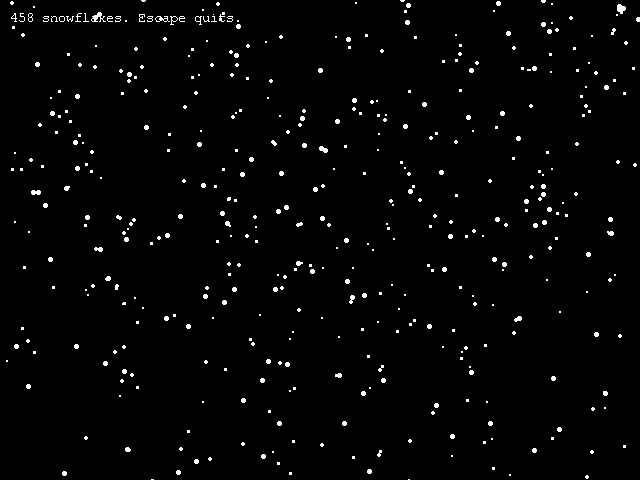
Type Flake…End Typedescribes a snowflake. EachFieldis something every flake has: a position, a speed and a size.f.Flake = New Flakemakes a brand new flake, andfpoints at it.f\xmeans "this flake's x". The backslash reaches inside it. (ArcBasic also understandsf.x, which you may see in other people's programs. This guide sticks to the backslash.)For f.Flake = Each Flake…Nextvisits every flake there is, one at a time, however many that is.Delete fgets rid of a flake for good. Here that happens once it has fallen off the bottom, otherwise the program would collect millions of invisible flakes.
Types are how almost every game keeps track of its bullets, enemies, coins and sparks. You'll use them for the falling stars in chapter 11.
Try this
- Give the skyline a moon, and make the buildings narrower: 32 of them, each 20 pixels wide.
- Add a
Field r, g, bcolour toFlakeand turn the snow into falling confetti. - Make flakes appear where you click the mouse, instead of at the top.