
Drawing pictures
Text is fine, but games need pictures. ArcBasic can draw shapes in any colour you like, and with loops it can draw thousands of them in a blink.
The screen is a grid of dots
Graphics 640, 480 opens a window 640 dots (pixels) wide and 480 high. Every pixel has an address: how far across it is (x) and how far down (y). The top-left corner is 0, 0. Notice that y counts down the screen, not up as in maths lessons.
(0,0) ----------- x gets bigger -----------> (639,0)
  |
  y gets bigger
  |
  v
(0,479)                                   (639,479)
Shapes and colours
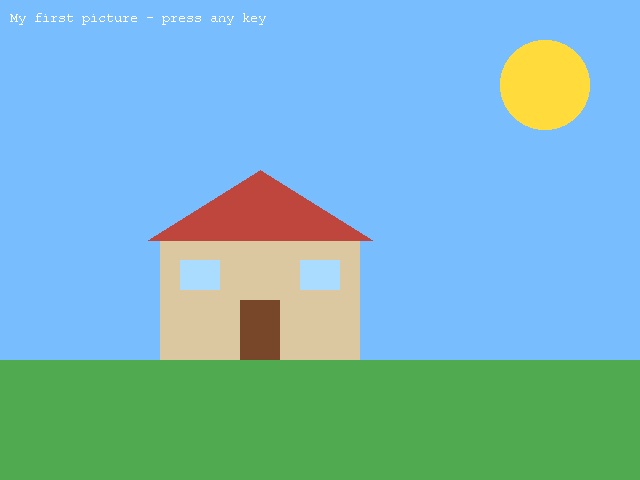
; Drawing a pictureGraphics 640, 480; the skyClsColor 120, 190, 255Cls; the groundColor 80, 170, 80Rect 0, 360, 640, 120; the sunColor 255, 220, 60Oval 500, 40, 90, 90; the houseColor 220, 200, 160Rect 160, 240, 200, 120; the roof: lines that get wider as they go down make a triangleColor 190, 70, 60For row = 0 To 70 Line 260 - row * 1.6, 170 + row, 260 + row * 1.6, 170 + rowNext; a door and two windowsColor 120, 70, 40Rect 240, 300, 40, 60Color 170, 220, 255Rect 180, 260, 40, 30Rect 300, 260, 40, 30Color 255, 255, 255Text 10, 10, "My first picture - press any key"WaitKeyEnd
| Command | Does |
|---|---|
Color red, green, blue | chooses the colour for whatever you draw next. Each part goes from 0 (none) to 255 (full), and mixing them makes any colour: 255, 0, 0 is red, 255, 255, 0 is yellow and 255, 255, 255 is white. |
ClsColor then Cls | chooses a background colour, then clears the whole window to it. |
Rect x, y, width, height | a filled rectangle with its top-left corner at x, y. Add , False on the end for just the outline. |
Oval x, y, width, height | an oval that fits in that rectangle. Equal width and height make a circle. |
Line x1, y1, x2, y2 | a line from one point to another. |
Plot x, y | a single pixel. |
Text x, y, "words" | writes text at x, y. |
There's no command for a triangle, so the roof is built from lines: each row is a little lower and a little wider than the one above it. That's a loop doing the hard work. Things are drawn in order, so later shapes go on top of earlier ones: the door is drawn after the wall, so it shows up on top.
Let the computer do the drawing
Loops and random numbers together can paint a whole sky:
; A starry night: loops and random numbers draw it for usGraphics 640, 480SeedRnd MilliSecs()ClsColor 10, 10, 40Cls; 300 stars, each somewhere random, in a random shade of whiteFor star = 1 To 300 bright = Rand(100, 255) Color bright, bright, bright Plot Rand(0, 639), Rand(0, 479)Next; a few bigger, brighter starsColor 255, 255, 200For star = 1 To 12 Oval Rand(0, 630), Rand(0, 470), 3, 3Next; the moon: a pale circle with a dark circle over it makes a crescentColor 240, 240, 220Oval 480, 60, 80, 80Color 10, 10, 40Oval 500, 50, 80, 80Color 255, 255, 255Text 10, 450, "Run it again for a different sky. Press any key."WaitKeyEnd
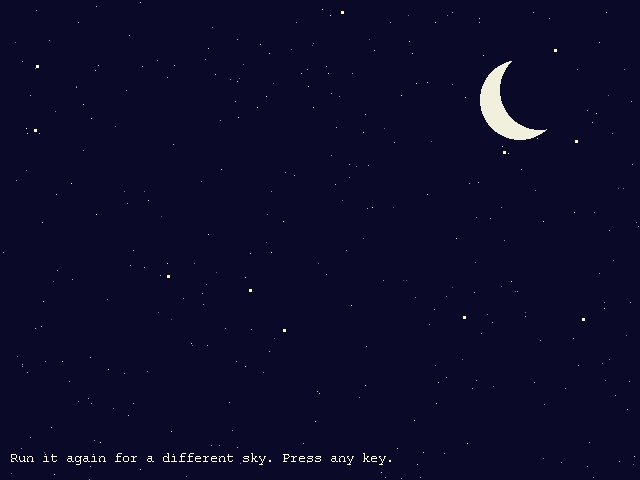
The moon is a trick: a pale circle with a dark circle drawn over most of it. Drawing over things is a very useful idea.
Try this
- Add a tree to the house picture: a brown rectangle with a green circle on top.
- Turn day into night: a dark sky, yellow windows and a moon.
- Draw 50 circles with random sizes, colours and positions. (You'll need
Randfor each one.)