
Variables and maths
Games have to remember things: your score, your lives, the player's name. A variable is a named box that holds a value, which you can look at and change whenever you like.
Three kinds of box
; Variables: named boxes that hold valuesscore = 10 ; a whole numberspeed# = 2.5 ; a number with a decimal pointname$ = "Robin" ; textPrint "Name: " + name$Print "Score: " + scorePrint "Speed: " + speedscore = score + 5Print "After a bonus, the score is " + scorePrint "Twice the speed is " + speed * 2WaitKeyEnd
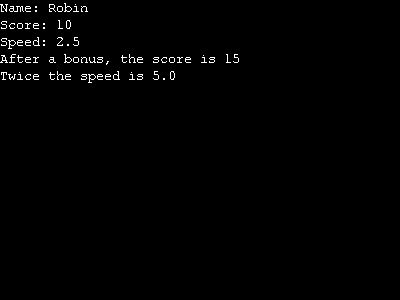
The end of a variable's name says what kind of value it holds:
| Name | Holds | Examples |
|---|---|---|
score | whole numbers (integers) | 0, 42, -7 |
speed# | numbers with a decimal point (floats) | 2.5, 0.1, -3.75 |
name$ | text (strings) | "Robin", "Game over" |
You only need the # or $ the first time you use a variable; after that, speed means speed#.
score = score + 5 looks odd if you think of = as "equals". Read it as "make score become score + 5": take what's in the box, add 5, and put the answer back.
+ also joins text together, and numbers are turned into text when you join them to a string. That's how "Score: " + score prints Score: 10.
Naming variables
Names can use letters, digits and _, but must start with a letter. Capitals don't matter: Score and score are the same box. A few words belong to the language itself, such as If, For, Each and End, so you can't use those as names. Choose names that say what the box is for: lives is much clearer than x.
Doing sums
| Sign | Means | Example | Answer |
|---|---|---|---|
+ | add | 7 + 2 | 9 |
- | take away | 7 - 2 | 5 |
* | multiply | 7 * 2 | 14 |
/ | divide | 7 / 2 | 3 (whole numbers stay whole) |
/ | divide | 7 / 2.0 | 3.5 |
Mod | the remainder after dividing | 7 Mod 2 | 1 |
^ | to the power of | 2 ^ 3 | 8.0 |
When both numbers are whole, dividing gives a whole number and throws the remainder away. If you want the decimal part, make one of them a float.
Asking questions
Input prints a question, waits for the player to type an answer and press Enter, and gives back what they typed. Put the answer in a number variable and ArcBasic turns it into a number for you.
; The pizza calculator: ask some questions, then work out an answername$ = Input("What is your name? ")pizzas = Input("How many pizzas are there? ")people = Input("How many people are eating? ")slices = pizzas * 8share = slices / peoplespare = slices Mod peoplePrint ""Print "OK " + name$ + ", that's " + slices + " slices."Print "Everyone gets " + share + ", with " + spare + " left over."WaitKeyEnd
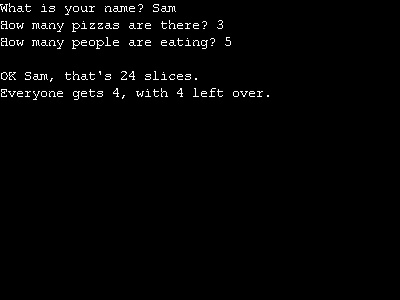
What happens if you say nobody is eating? Dividing by zero is impossible, so the program stops with an error. In chapter 3 you'll learn how to check for things like that first.
Try this
- Pizzas are sometimes cut into 6 slices. Change the program so it asks how many slices each pizza has.
- Write a program that asks for your age and prints how old you'll be in 10 years.
- Ask for a distance in kilometres and print it in miles. One kilometre is about
0.62miles, so you'll want float variables.