
Functions
Programs get long. A function lets you take a job, like "draw a ship", give it a name, and then do the whole job with one line, as often as you like.
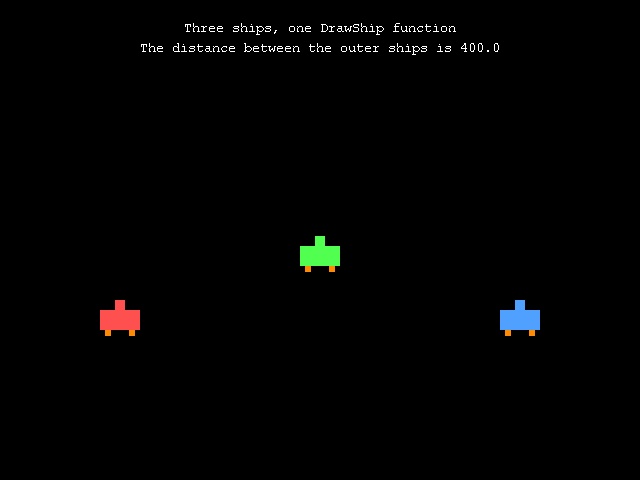
; Functions: name a job once, then use it as often as you likeGraphics 640, 480SetBuffer BackBuffer()Global frames = 0 ; Global: every function can see itWhile Not KeyHit(1) frames = frames + 1 Cls ; three ships, drawn by one function DrawShip(100, 300, 255, 80, 80) DrawShip(300, 200 + Wobble(40), 80, 255, 80) DrawShip(500, 300, 80, 160, 255) Color 255, 255, 255 Text 320, 20, "Three ships, one DrawShip function", True Text 320, 40, "The distance between the outer ships is " + Distance(100, 300, 500, 300), True FlipWendEnd; Draws a ship at x,y in the colour r,g,bFunction DrawShip(x, y, r, g, b) Color r, g, b Rect x, y + 10, 40, 20 Rect x + 15, y, 10, 10 Color 255, 140, 0 Rect x + 5, y + 30, 6, 6 Rect x + 29, y + 30, 6, 6End Function; Gives back a number that swings smoothly between -size and sizeFunction Wobble(size) Return Sin(frames * 3) * sizeEnd Function; Gives back how far apart two points areFunction Distance#(x1#, y1#, x2#, y2#) dx# = x2 - x1 dy# = y2 - y1 Return Sqr(dx * dx + dy * dy)End Function
Making a function
A function starts with Function and its name, and ends with End Function. Put your functions after the main program's End.
The names in brackets are its parameters: values you hand over when you use it. DrawShip(100, 300, 255, 80, 80) runs the DrawShip code with x = 100, y = 300 and the colour 255, 80, 80. Three calls with different values make three different ships, and if you want to change how ships look, there's only one place to change it.
Functions that give an answer
Return hands a value back to whoever used the function, so you can use it like a number or a word: Wobble(40) is a number that swings between -40 and 40 as time goes on. Distance# ends with # because the answer it gives back is a float.
Many of ArcBasic's own commands are functions just like these. Rand(1, 10) and Sqr(16) give back a value too.
Global and local
Variables you make inside a function are local: they belong to that function only, and they're gone when it finishes. dx in Distance can't clash with a dx anywhere else.
The same goes the other way: a function can't see the main program's variables. If something needs to be shared, such as the score or a frame counter, declare it Global at the top, as frames is here. Use Global only for the things that really need sharing. It's much easier to understand a function when everything it uses comes in through its parameters.
Try this
- Write a
DrawTree(x, y)function and plant a small forest with aForloop. - Add a size parameter to
DrawShip, and draw a big ship and a small one. - Write
Function Biggest(a, b)that returns whichever number is larger.