
Your first game: Star Catcher
Time to put everything together. Star Catcher has a title screen, stars to catch, rocks to dodge, extra lives, levels that get harder, sparks, and a game-over screen. Every part of it uses something from an earlier chapter.
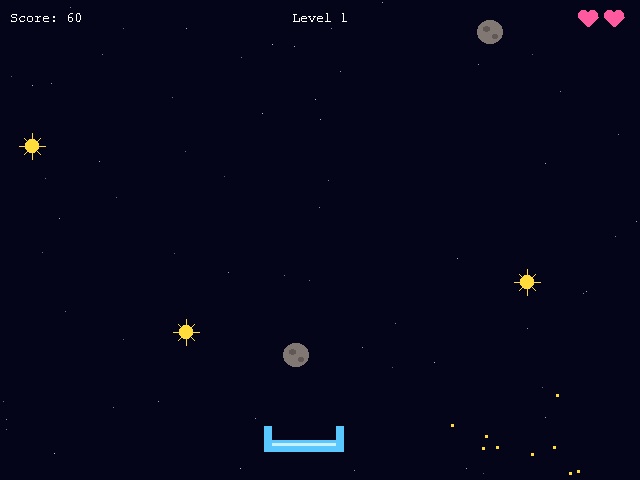
Open it, press F5 and have a game first. Then read on to see how it's made.
; Star Catcher - a complete game; Catch the falling stars, dodge the rocks, and grab a heart for an extra life.; Arrows move. Space starts. Escape quits.Graphics 640, 480SetBuffer BackBuffer()SeedRnd MilliSecs()AppTitle "Star Catcher"; ---- the things that fall, and the sparks they make ----Const STAR = 1, ROCK = 2, HEART = 3Type Faller Field x#, y#, speed# Field kindEnd TypeType Spark Field x#, y#, dx#, dy# Field life Field r, g, bEnd Type; ---- the background: dim stars drifting past ----Dim skyX(59), skyY#(59), skySpeed#(59)For i = 0 To 59 skyX(i) = Rand(0, 639) skyY(i) = Rand(0, 479) skySpeed(i) = Rnd(0.3, 1.2)Next; ---- the state of the game ----Const TITLE = 0, PLAYING = 1, GAMEOVER = 2Global state = TITLEGlobal catcherX#, score, lives, level, bestGlobal nextDrop ; frames until something else fallsGlobal flash ; frames left of the red flash when a rock hits; ---- the main loop ----While Not KeyHit(1) Select state Case TITLE If KeyHit(57) Then NewGame() Case PLAYING UpdateGame() Case GAMEOVER If KeyHit(57) Then NewGame() End Select MoveSky() MoveSparks() DrawGame() FlipWendEnd; Clears everything away and starts a new game.Function NewGame() For f.Faller = Each Faller Delete f Next catcherX = 280 score = 0 lives = 3 level = 1 nextDrop = 30 state = PLAYINGEnd Function; One frame of play: move, drop things, check for catches.Function UpdateGame() ; move the catcher, but not off the screen If KeyDown(203) Then catcherX = catcherX - 8 If KeyDown(205) Then catcherX = catcherX + 8 If catcherX < 0 Then catcherX = 0 If catcherX > 560 Then catcherX = 560 ; every so often, something new falls: more often, and more rocks, on higher levels nextDrop = nextDrop - 1 If nextDrop <= 0 f.Faller = New Faller f\x = Rand(15, 625) f\y = -20 f\speed = Rnd(2, 3) + level * 0.5 chance = Rand(1, 100) If chance <= 4 Then f\kind = HEART ElseIf chance <= 30 + level * 3 Then f\kind = ROCK Else f\kind = STAR EndIf nextDrop = Rand(20, 45) - level * 3 If nextDrop < 8 Then nextDrop = 8 EndIf ; move everything that is falling, and see what the catcher catches For f.Faller = Each Faller f\y = f\y + f\speed If RectsOverlap(catcherX, 426, 80, 26, f\x - 12, f\y - 12, 24, 24) Select f\kind Case STAR score = score + 10 Burst(f\x, f\y, 255, 220, 60) Case ROCK lives = lives - 1 flash = 8 Burst(f\x, f\y, 160, 150, 145) Case HEART If lives < 5 Then lives = lives + 1 Burst(f\x, f\y, 255, 90, 160) End Select Delete f ElseIf f\y > 500 Delete f EndIf Next ; a new level every 100 points level = 1 + score / 100 If lives <= 0 state = GAMEOVER If score > best Then best = score EndIfEnd Function; A shower of sparks, in a colour, flying out from x,y.Function Burst(x#, y#, r, g, b) For i = 1 To 24 s.Spark = New Spark s\x = x s\y = y angle# = Rnd(0, 360) speed# = Rnd(1, 5) s\dx = Cos(angle) * speed s\dy = Sin(angle) * speed s\life = Rand(20, 40) s\r = r : s\g = g : s\b = b NextEnd FunctionFunction MoveSparks() For s.Spark = Each Spark s\x = s\x + s\dx s\y = s\y + s\dy s\dy = s\dy + 0.15 ; gravity pulls them down s\life = s\life - 1 If s\life <= 0 Then Delete s NextEnd FunctionFunction MoveSky() For i = 0 To 59 skyY(i) = skyY(i) + skySpeed(i) If skyY(i) > 480 Then skyY(i) = 0 : skyX(i) = Rand(0, 639) NextEnd Function; Draws everything: background, falling things, sparks, then the words on top.Function DrawGame() If flash > 0 ClsColor 90, 0, 20 flash = flash - 1 Else ClsColor 5, 5, 25 EndIf Cls For i = 0 To 59 shade = 60 + skySpeed(i) * 120 Color shade, shade, shade Plot skyX(i), skyY(i) Next For f.Faller = Each Faller Select f\kind Case STAR : DrawStar(f\x, f\y) Case ROCK : DrawRock(f\x, f\y) Case HEART : DrawHeart(f\x, f\y) End Select Next For s.Spark = Each Spark Color s\r, s\g, s\b Rect s\x, s\y, 3, 3 Next Select state Case TITLE Color 255, 220, 60 Text 320, 150, "S T A R C A T C H E R", True, True DrawStar(200, 150) : DrawStar(440, 150) Color 255, 255, 255 Text 320, 210, "Catch the stars. Dodge the rocks.", True, True Text 320, 230, "Hearts give you an extra life.", True, True Text 320, 290, "Arrows move. Press Space to start.", True, True If best > 0 Then Text 320, 330, "Best score: " + best, True, True Default DrawCatcher(catcherX, 440) Color 255, 255, 255 Text 10, 10, "Score: " + score Text 320, 10, "Level " + level, True For i = 1 To lives DrawHeart(640 - i * 26, 18) Next If state = GAMEOVER Color 255, 90, 90 Text 320, 200, "G A M E O V E R", True, True Color 255, 255, 255 Text 320, 235, "You scored " + score + ". Best: " + best, True, True Text 320, 265, "Press Space to play again", True, True EndIf End SelectEnd FunctionFunction DrawStar(x, y) Color 255, 220, 60 Oval x - 7, y - 7, 14, 14 Line x - 13, y, x + 13, y Line x, y - 13, x, y + 13 Line x - 8, y - 8, x + 8, y + 8 Line x - 8, y + 8, x + 8, y - 8End FunctionFunction DrawRock(x, y) Color 130, 120, 115 Oval x - 13, y - 12, 26, 24 Color 95, 88, 85 Oval x - 7, y - 6, 7, 6 Oval x + 2, y + 2, 6, 5End FunctionFunction DrawHeart(x, y) Color 255, 90, 160 Oval x - 10, y - 8, 11, 11 Oval x - 1, y - 8, 11, 11 For row = 0 To 9 Line x - 10 + row, y - 1 + row, x + 10 - row, y - 1 + row NextEnd FunctionFunction DrawCatcher(x, y) Color 90, 200, 255 Rect x, y, 80, 12 Rect x, y - 14, 8, 14 Rect x + 72, y - 14, 8, 14 Color 200, 240, 255 Rect x + 8, y + 3, 64, 3End Function
The plan
Before writing a game, it helps to write down what's in it:
- Things that fall: stars (+10 points), rocks (lose a life) and the odd heart (an extra life). They're all the same kind of thing with a different
kind, so oneType Fallerdescribes them all. - Sparks burst out when you catch something: another type,
Spark, each with a position, speed, colour and a short life. - Three screens: the title, the game itself and game over. The variable
statesays which one we're on.
Constants
Const STAR = 1, ROCK = 2, HEART = 3 gives names to numbers that never change. f\kind = ROCK is much easier to understand than f\kind = 2, and it stops you mixing the numbers up. The three screens get names the same way.
The main loop
The main loop is short, because the work is done by functions. A Select on state decides what happens this frame. On the title and game-over screens, Space starts a new game; while playing, UpdateGame runs. Whatever the state, the sky drifts, the sparks fly and DrawGame draws the frame. Splitting a game into update (change things) and draw (show things) keeps it tidy.
UpdateGame
- Moving works just like the ship in chapter 7.
- Dropping:
nextDropcounts down frames. When it reaches 0, a newFalleris made at a random place along the top. A random number from 1 to 100 picks what it is: 1 to 4 make a heart, then up to 30 (plus a little more each level) a rock, and everything else a star. The countdown restarts at a random length, shorter on higher levels. - Catching: every faller moves down, and
RectsOverlapchecks it against the catcher. ASelecton its kind decides what catching it does, and then it's deleted. Anything that falls past the bottom is deleted too. - Levels:
level = 1 + score / 100. Whole-number division makes the level go up by one every 100 points, and the level speeds everything up. - Game over comes when lives run out. The best score is kept for as long as the program runs.
Sparks
Burst makes 24 sparks flying outwards in random directions. Cos and Sin of a random angle give a direction, and a random speed sets how far each one goes per frame. MoveSparks adds a little to each spark's downward speed every frame, which is gravity, so they curve and fall. When a spark's life runs out, it's deleted. Small effects like this make a game feel alive.
Drawing
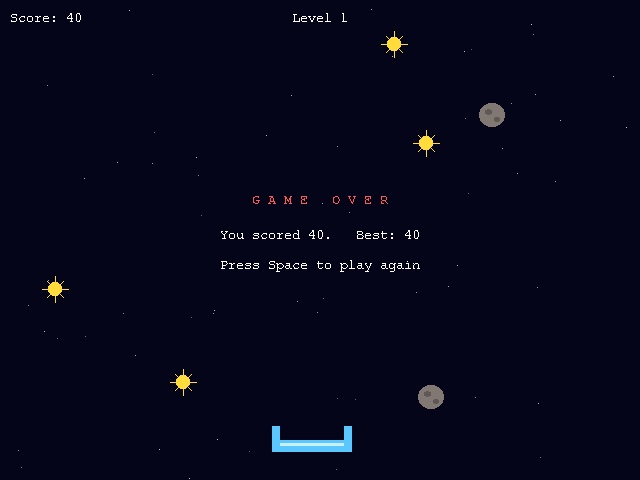
DrawGame draws from the back to the front: background, sky, falling things, sparks, then the score and messages on top. Each kind of object has its own small drawing function. The heart is two circles plus a triangle made of lines, like the roof in chapter 5. When a rock hits, flash turns the background red for a few frames.
Make it yours
The best way to learn is to change a game you understand. Some ideas, from easy to harder:
- Change the colours, the speeds and how many lives you start with.
- Add a new kind of faller: a golden star worth 50 points that falls very fast.
- Make missing a star cost points, so you can't just sit and wait for hearts.
- Add sound: put a
.wav,.oggor.mp3file next to the program, load it withLoadSoundat the start, and play it withPlaySoundwhen you catch a star. - Let the catcher fire upwards at the rocks, using a new
Type Shot.